Evidence-grounded reading companion
Marginalia
Let the text speak.
Understand difficult books, argue with their claims, and keep only what matters. Every answer returns to the text.
Version 2.3.0 · macOS (Apple silicon) and Windows x64 · Local-first preview
When a book makes you stop
Understanding begins where summaries end.
Marginalia is not an ebook reader and it does not read in your place. Bring it the chapter that confused, challenged, or changed you.
The goal is not to finish faster. It is to leave with a thought you can defend.
One chapter, three forms of attention
Stay with the argument.
Move from clarification to disagreement without losing the page that started it.
DISCUSS
Bring one confusion into focus.
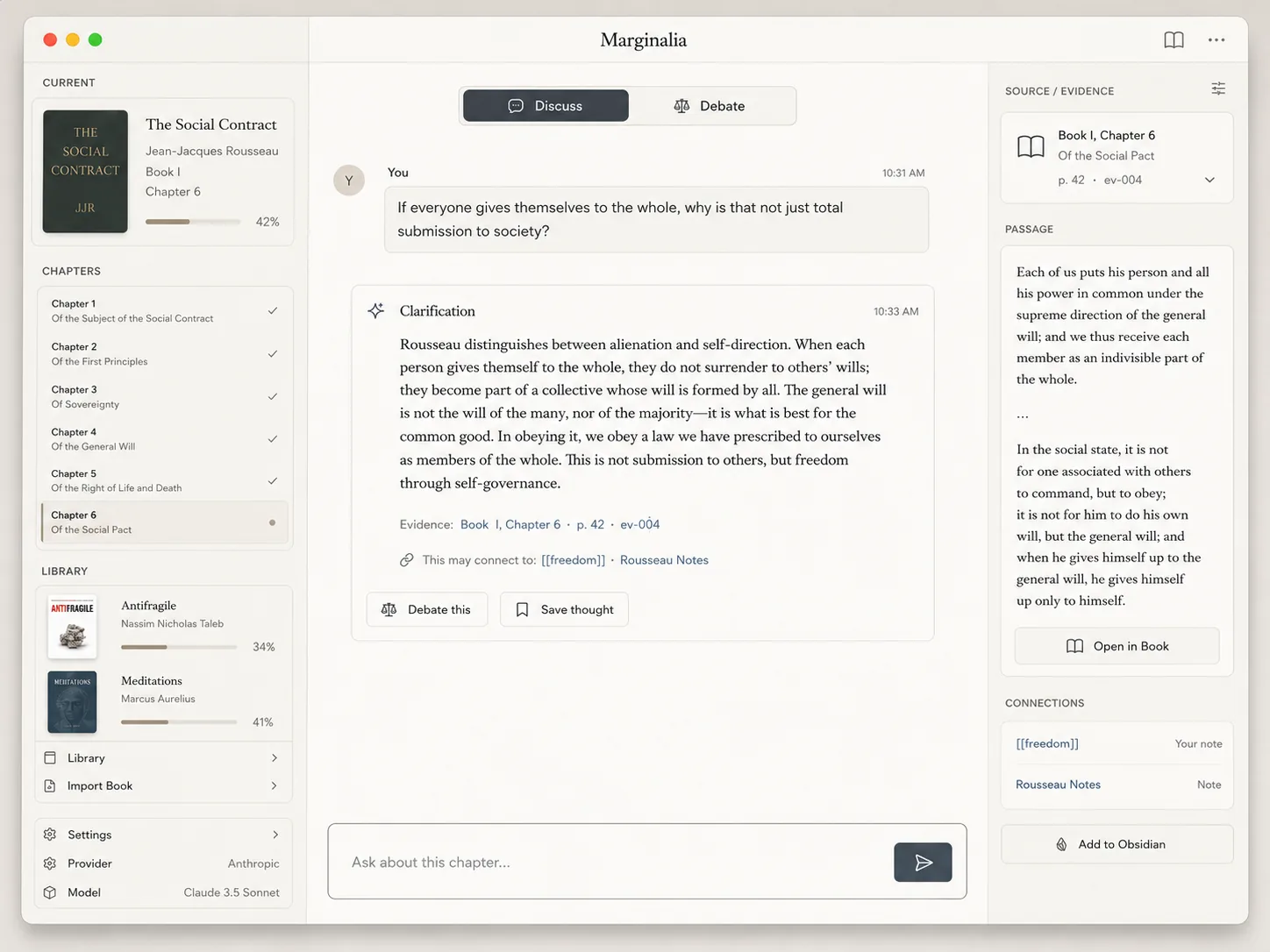
Ask what a passage means, why the author makes a move, or how two parts of a chapter fit together.
- Compact clarification
- Verified source line
- Optional visible reasoning
Text sovereignty
The AI never gets the last word. The page does.
Marginalia can only reconstruct what the imported text supports. If the chapter is silent, the answer says so.
“The current text does not provide enough evidence.”
A question, confusion, or objection.
Relevant passages from the selected chapter and allowed context.
Every important answer points back to page, chapter, or evidence ID.
The chapter distinguishes obedience to another person from obedience to a law one helps prescribe.
From file to thought
A complete reading workflow, on your Mac.
Import once. Return whenever a chapter gives you something worth understanding.
-
01
Import locally
PDF, DOCX, EPUB, Markdown, text, and common image files.
-
02
Open a real chapter
Full-text conversion, chapter detection, OCR, and evidence indexing happen before entry.
-
03
Discuss or debate
A short chapter is read in full; a long one is ranked by relevance. Citations stay inspectable.
-
04
Keep what matters
Edit a knowledge card, copy Markdown, or write it into Obsidian. Every past exchange stays searchable.
Roundtable
One book. More than one lens.
Keep the book fixed, then invite one or two declarative reading lenses to examine the same evidence. Every round stops for you.
The lenses never outrank the book, and they never continue talking without the reader.

Thought traces
Save the thought, not the transcript.
A strong exchange can become one editable card with its source, tags, wikilinks, and your own note. Nothing is saved automatically, and once a vault is connected those notes can answer back.
- Create a card yourself or accept one suggestion.
- Preserve whether it came from the book, a lens, or you.
- Copy, download, or export Obsidian-ready Markdown.
- Let your existing notes answer too, separately from the book.
---
type: thought-card
book: "Antifragile"
chapter: "Chapter 1"
origin: book
source:
  - "p. 38"
tags:
  - risk
  - fragility
links:
  - "[[risk]]"
  - "[[fragility]]"
---

# When pressure becomes practice

## Core idea

A system needs bounded stress to learn
without being destroyed by the lesson.

## My note

...
Local-first by design
Your library is not our library.
Books, chapters, evidence, conversations, and cards are stored locally. File conversion, OCR, indexing, card editing, and Obsidian export happen on your machine.
Source files, the full local index, cards, Vault index, restorable workspace backups, and encrypted desktop credential.
Your question and selected evidence for AI analysis, Discuss, Debate, or Roundtable.

Marginalia 2.3.0
Start with one difficult chapter.
A local preview build for Apple silicon Macs. Bring your own OpenAI or Kimi API key; no account is required.
Before you install
- Open the DMG and move Marginalia to Applications.
- This preview is not notarized, so macOS blocks the first launch and may claim the app is damaged. It is not damaged. Either Control-click the app and choose Open, or run
xattr -dr com.apple.quarantine /Applications/Marginalia.appin Terminal. - In Settings, select OpenAI or Kimi, enter your own key, and test the connection.
- Optionally connect an Obsidian Vault for local card export.
If you are on Windows
- Run the installer and follow the wizard; it installs for the current user.
- Windows SmartScreen will warn about an unrecognised app because this build is not code-signed. Choose More info, then Run anyway. The same note ships beside the installer.
- In Settings, select OpenAI or Kimi, enter your own key, and test the connection.
Questions
A few honest answers.
Does Marginalia summarize an entire book for me?
No. It converts and indexes the whole source so you can work chapter by chapter, but its purpose is deeper reading, not skipping the book.
Does it pretend to be the author?
No. Discuss clarifies the text; Debate reconstructs the strongest response the book can actually support. If the evidence is absent, Marginalia concedes.
Which files can I import?
PDF, DOCX, EPUB, Markdown, TXT, and common image formats. Scans and images use the bundled macOS Vision OCR engine.
Do I need Obsidian?
No. Cards can be edited, copied, and downloaded without a Vault. Connecting one is optional; it also lets your existing notes answer alongside the book, in a separate response.
Is there a Windows version?
A Windows desktop build exists and is verified on Windows; the download on this page is the Apple silicon build.
macOS says the app is damaged. Is the download broken?
No. The file is intact. macOS shows that message for apps that are not signed with a paid Apple Developer certificate, and this preview is not. Control-click the app in Applications and choose Open, or run xattr -dr com.apple.quarantine /Applications/Marginalia.app in Terminal once. The same note ships inside the DMG as 首次打开说明.txt.